THE TECHNOLOGY PROCESS
As a leader in your business or place of work, you may feel limited due to technological inefficiencies. We all have challenges, but many can be solved with time, investment, and shared alignment. It’s important to explore and adopt new ways of being productive together as a team.
It might be hard to consider managing the business differently. Rightfully so, things have been set up the way they are for reasons that come with experience and expertise. While some come close, there is no “one-size-fits-all” technology solution that meets the varying needs of a business across departments. And with the rise of remote work, many businesses have found it hard to attract, train, and retain talented team members. No matter how much research you do, investing in migrating to a new technology platform is a risk without first-hand experience. You may know the specific functionality you need, but you may not know what you don’t know when it comes to newer time-saving features and compatibility. Many don’t need the Porsche of technology stacks to run the business effectively, but a turbo does wonders for any motor at a remarkably affordable price. The important thing to keep in mind is that you want a technology stack that accommodates, competes, and scales now, three and ten years down the line.
Outline Current Technology Architecture
List the technology you use for the business and primary functions of each, organized by department. Make note of the team members that utilize each software and what for. While complaining in the workplace is usually discouraging to morale, acknowledge the pain-points you experience using your current software. Is there a lack of communication or accountability? Do you spend hours each week digging through emails to maintain either? Can your team operate remotely? How do you manage operations, manufacturers or agencies, and how do you relay and document pertinent information for team members? Is the digital experience of your brand lacking? What does success look like if technology is no longer a hurdle, but a stepping stone?
No matter the industry and line of work you’re in, there are likely opportunities to leverage technology in support of a more positive, collaborative, and productive work environment.
Technology Stack Overview
As mentioned in The Branding Process, the technology you choose needs to play well together. Below is a list of industry-standard softwares that are compatible and scalable for most business needs.
General Automation Platforms
With general automation platforms you can connect and share data between software via application programming interface (API) without a developer. With the increasing digital demands of team members and consumers, GAPs such as Tray.io and the more popular Zapier are utilized by many businesses. Some cloud-based software companies make their platforms API compatible with built-in triggers that can be configured once you establish a connection between applicable softwares. Other platforms simply allow for open API access, making it so that a developer can create API triggers and map “fields” custom to your needs accordingly. This means that depending on your software’s compatibility, you may have no need for a general automation platform. However, it is a good idea to ensure that your software stack integrates with GAPs to integrate softwares in the future if need ever arises.
Tray.io
- $500 /mo
- Superior flexibility with built-in debugging features
- Modern UX and simple UI
- Enterprise security
- Build exactly what you need with loops, conditionals, branching, and more
- Identify issues quickly to build and iterate quickly
Zapier
- $20 /mo
- Shopify and Square only available with Zapier
- Easy to use
- Works well for most “small” business needs
Work Management Platforms and Enterprise Resource Planning (ERP) Software
Whether you’re a small business, startup, or enterprise corporation, Asana can help you and your team manage operations on-site and remotely. Many businesses use Trello or Basecamp to manage their teams and track projects. These are very well established software companies used by thousands of teams around the world, but they do not compete with Asana. Monday is most comparable to Asana, and if you are opposed to Google-owned software (understandably so considering Google rescinded their slogan of “don’t do evil”) it is an alternative.
Asana
- Organize by team, department, or function
- Create operational structure and/or projects
- Create tasks within “projects”
- Set due dates and assign to team members
- Track time on projects or tasks with Harvest or other time-tracking software integrations
- Add columns and custom fields to each department for more robust sorting and quick reference
- Configure automations between departments
- Add comments to projects or tasks, attach files, and tag team members to notify them (or configure automatic notifications)
- Provide custom task lists per team member
- Limit access to departments, projects, or tasks
- Add guest users to manage contractors and agencies (reducing email)
- Track team member progress
Internal Email Software
You can use Google (Gmail) or Microsoft (Outlook) to create email addresses with your website domain name. Work with your domain hosting service provider to set this up. In doing so you gain access to other business tools such as Microsoft Word, Excel, Power Point, or Googles “equivalents”.
Analytics Management Software
In setting up your G Suite and Google Admin you gain access to a variety of tools. Bing has a similar offering. These tools will help you track and measure analytics granularly, and provide a custom top-level view of the specific information (KPIs) most pertinent to your business.
Access charts, graphs, and reports to better serve your community online and in-person. Reach more potential and repeat customers with targeted ads via Google Ads.
Development Management Software
There may come a time when custom development for your website, app, or business software becomes necessary. In this case, it would be nice to have the means of tracking development projects without changing project management software. Asana will integrate with most industry-standard development platforms, keeping you and team members out of the code and up to date on development projects.
- Github, AWS, Jira, etc.
Point of Sale
When it comes to online and in-store sales, it’s best to have customer data available in one place. Using Shopify as a point of sale gives you the ability to process and store data for online and in-store sales within one platform. Connect Shopify to your CRM via API to view transaction and customer history from a dashboard to better report and analyze data. Set “triggers” to automatically update “contact’s” profile or send notifications based on customer and team member actions. Note: These “triggers” will likely correlate with your customer journey map as can be established with a Brand Playbook. Shopify’s shipping features are user friendly and integrate with DHL, UPS, and USPS accounts.
Inventory Management Software
When products are sold through multiple channels it’s important to have inventory updates syncing and/or available in one place. Shopify connects to other software where inventory is managed. Again, sync order and transaction history at a customer level by integrating Shopify with your CRM.
Financial Accounting Software
Regardless of how you’ve tracked finances up to this point, we can all agree that having pertinent financial records and reports available across departments is valuable. Unless you already use an ERP software to house and manage your financials, Quickbooks is an affordable and accommodating platform that integrates with most software. You can share payroll data between Harvest (or other time-tracking software) as well as Gusto with Quickbooks to streamline managing payroll.
Team Communication Software
Connect team members and track conversations using Slack. Integrate Slack with Asana to get automated updates pertinent to your entire team or individual departments. Create channels to categorize conversations and limit congestive small talk to designated spaces.
Customer Relationship Management Software
Zoho CRM is free, but Zoho as a whole is limiting and can be difficult to use. NetSuite also offers a free CRM, but everything else comes at a substantial price point. Salesforce is very costly altogether, and while it has good email marketing capabilities, it’s not for everyone. Hubspot advertises a free CRM, but they charge depending on how many “contacts” you store. That being said, Hubspot is the all around best option as it scales to meet the needs of any business.
Zoho
- Real-time website visitor data
- Website chat (free)
- Lead scoring
- Social media profile attachment
- Free – $45 /user
- Less resources – Zoholics is an annual conference for detailed walkthroughs of every aspect of the platform and upcoming functions / features (recordings available online)
- Not so great customer service
- Mobile app
Salesforce
- User friendly
- Online resources to learn from, conferences / events with hands-on training
- Enterprise solutions
- Expensive
- Mobile app
Hubspot
- Inbound marketing, sales, and customer service
- Dynamic content
- Forms
- Website chat
- No mobile app
- Free CRM (cost applies over certain number of stored contacts)
- Much more
Video Conferencing Software
Many use video “conferencing” software such as FaceTime, Facebook video, or Google Meets (formerly Google Hangouts). It’s also likely you’ve already used Zoom or GoTo Meeting. For those unfamiliar, Zoom allows users to connect online over video and to record meetings with high-quality video. Audio quality will vary more or less depending on your microphones, but it has sound dampening features to minimize background noise (as do other apps). Use Zoom to conduct remote meetings, customer service calls where screen sharing is necessary, virtual happy hours, or other scenarios where a more human interaction and/or screen sharing is beneficial.
Call Management Software
If you conduct outgoing sales calls and want to track or record conversations, RingCentral or
are good options. RingCentral has their own call center that works similarly to Amazon Connect, however, call transcriptions aren’t included (just recordings). But, RingCentral does have a multi-year contract with Zoom, making it a complementary choice. For transcriptions, use Rev.com. And as a free call software alternative, Google Voice allows you to create a custom number with a local zip code of your choosing.
Third-party Marketplaces
Third-party marketplaces such as Amazon Seller Central or Etsy allow businesses to gain market share through their platforms’ users. However, they come with their own set of rules, limitations, and costs. Shopify integrates with many third-party marketplaces to make managing inventory and sales simple. Combined with an integrated CRM, you can have a very robust view of sales across channels. While it’s not recommended, many successful online businesses sell strictly through Amazon Seller Central and generate millions of dollars in revenue each year. Keep in mind, it’s important to optimize each third-party marketplace “store” for SEO (search engine optimization) and customize with branded assets tailored to the platform’s specifications. There are abundant resources available online to help you get the most out of an Amazon store.
Cloud Storage Software
Cloud storage software is used to store files digitally. The primary advantage of cloud storage software (vs your computer’s hard drive or external hard drives) is accessibility and file sharing with your team and others. Most businesses use Dropbox, Box, or Google Drive.
Dropbox has a great feature where no matter what files are deleted, you can retrieve them. It is however always wise to store backups of your business files on an external hard drive. Also, some files you may not want (or be ready) to store in the cloud (such as unedited video or photography). With video specifically, it is good to store unfinished footage on external hard drives and access them with Adobe Premier Pro or other video editing software. You can also use an online platform like Frame.io to store and edit videos. If an agency is producing the footage, this platform makes it easy to review and collaborate throughout the video editing process.
Content Management System
A content management system goes hand-in-hand with your website. Most website providers offer a content management system, although some are better than others. WordPress is highly recommended as an industry-standard. Shopify offers a CMS, but it is recommended to use Shopify strictly as your point of sale for e-commerce and in-store sales as long as website traffic and customer data is synced between platforms. Hubspot also offers a content management system that makes publishing content across channels very streamlined. Hubspot’s SEO optimization features are comparable to WordPress’.
Email Marketing Software
Email marketing software is widely used. The email marketing platform you choose will determine how curated of an experience you can offer your community. Klaviyo is a good option if you want access to all customer data and just about any feature a business could want. Mailchimp offers standard email marketing data and automation triggers, but is more limited despite being very user-friendly.
Create automated email campaigns based on your content and customer personas. Set custom triggers by activity to send curated content, and use campaign data to nurture with future content. As mentioned above, Salesforce offers good email marketing capabilities (particularly for B2B businesses). However, if you’re going to spend money on email marketing software, you might as well invest in Hubspot as it is the most advanced and user-friendly out of all email marketing software with automated email workflows that allow for if/then branching (similar to Salesforce but more robust and affordable).
Social Media Management Software
Social media management software is used to pre-schedule posts and manage much of your social media interactions. With advanced social media management software like Sprout Social you can gain access to profile, keyword, and hashtag monitoring, along with advanced analytics and social media servicing tools that allow you to comment on posts and respond to messages within the app. If you’re not looking to spend $100+ per month on social media management software, Later is a good option built for Instagram. Better yet, Hubspot and Mailchimp offer social media management tools, but remember that you can pre-schedule posts directly on Facebook for free using Facebook Business Manager (which will help you to avoid algorithmic penalties that reduce post ranking, and therefore, visibility/reach). Similarly, you can integrate Instagram with Facebook and automatically share Instagram posts to your Facebook.
Solutions Architecture
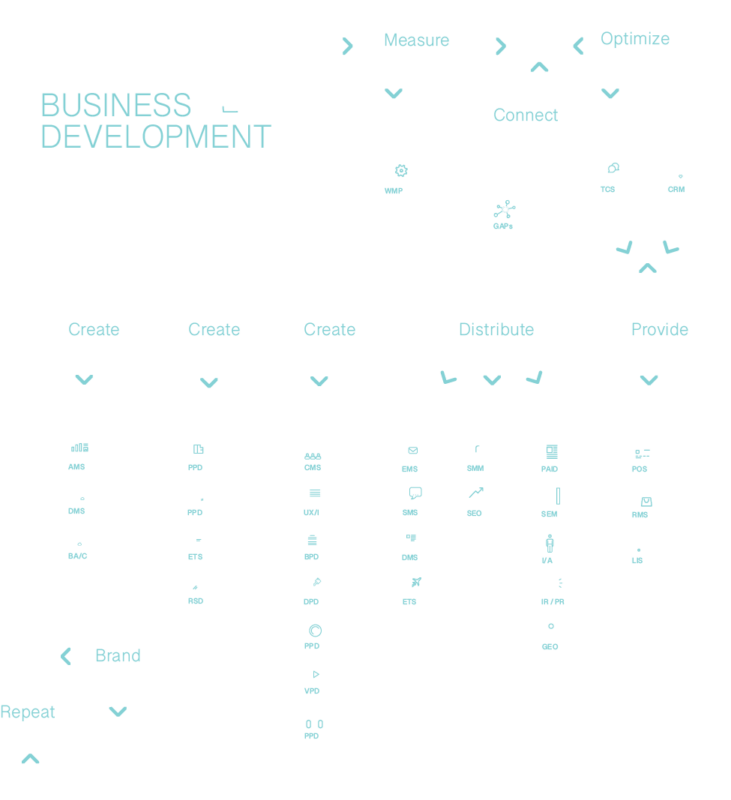
In learning how multiple cloud softwares can work together you can then create a solution architecture to help ensure the right software is chosen for your business. By getting familiar with the triggers available for each software you will determine the data fields that can be shared and map process workflows and automations accordingly. Reference the “Business Development and Automation” graphic for a top-level view of business functions and how they support each other. The list above is based on a variety of factors and features. If you find yourself questioning any of the platforms within a category, open up Google or Bing and search, for example, “CRM Salesforce vs other software”. The top suggestions will populate and allow you to gain other insights about business management software. Always confirm pre-existing API integrations or at least open API access. Ultimately, your priorities as a business and unique preferences as a team will determine the software you choose. Some care a lot about user experience and simplicity, while others prefer the most customization and granular tracking as possible. Either way, it’s important to have alignment across your organization to ensure all team members work together in the same direction at pace.
Optimize Automation
Once you’ve chosen software and setup integrations between two or more platforms, data can be shared to and/or from each. Fields need to be configured accurately to ensure data is not compromised. Prioritization needs to be set to ensure one platform is the “source of truth” over the secondary to avoid corrupting your data. Remember, triggers are preconfigured automations that update fields as changes occur. You can specify how updates from team members or customers trigger other automated “workflows”.
Common Automation Triggers
- Subscribes to list
- Unsubscribes from list
- Form submissions
- Email open
- Email link click-through
- Email reply
- Website visit
- Conversions
- Purchases
- Cart abandonment
- Ranking change
- Enters a pipeline / sales funnel
- Deal stage change
- Event recorded
- Goal is achieved
- Tag added / deleted
- Date shifting
- New contact / member
- Fulfillment
- Inventory changes
- Project / task created / deleted
Conclusion
Whether you’re looking to create a wholistic technology stack or simplify a few ways to manage the workload more efficiently or effectively, cloud software is a good option as long as you keep on-premises backups of pertinent information readily available. Stay in sync across departments and connect with your community promptly and proactively in a curated fashion. Transition to software that supports lean operations and remote work. Set yourself and team members up for success with technology that scales as your business adapts to change.